 |
Check on for Weather
"Click on area of interest below"
"CAYMAN KAI VACATIONS"
 |
|
|
|
|


- Driving Directions to
- “The Island Houses of Cayman Kai”
- from the Airport/George Town area
|
|
|
|
|
|
- Entrance & Exit to
- Owen Roberts International Airport (GCM)
If you are picking up a rental car, you should turn left as you leave the Customs Hall through the airport terminal exit doors and you will see all of the rental car companies in the plaza about 200 yards across the street except if you are using "Andy's Rent-A-Car" you will see their offices just across the parking lot ahead and bear right as you leave the airport terminal doors.
|
|
The directions below will lead you to “The Island Houses of Cayman Kai” in the Cayman Kai/Rum Point area.
The figures shown in “bold” show the Trip Odometer reading in miles at that point or turn.
On Grand Cayman - Always drive on the “Left” side of the road!!!
Finding your way from Owen Roberts International Airport to The Island Houses of Cayman Kai is fairly easy! Grand Cayman is a small island, and there's basically one main road that follows near the southern coastline from the airport all the way round the far eastern end and then up and along the north coast to Rum Point. There’s a cross-island road at Frank Sound which you will take because that is a shorter route to cut across to the north coast.
Depending if you observe the speed limits (mostly 30 mph, maximum 50 mph only in a few places) or if you get behind a slow driver, it should take you about 45 to 50 minutes to reach Rum Point, which is part of the very special area known as Cayman Kai. The Island Houses of Cayman Kai complex is in the very heart of Rum Point.
There's only one exit road from the airport and rental car plaza, which ends after about one mile at a stop sign and T-junction.
At the stop sign, just beside the Post Office on the left, turn left, and continue past Foster's Food Fair keeping to the left side of the road, until the "Give Way" sign at the “roundabout” (traffic circle).
|
You can also choose to stop and shop for groceries at the Foster’s Food Fair on the right. They have a wide selection of groceries from North America, the UK, and other locations. If you want to have a stock of wine, beer, etc. you can buy it at the liquor store in this shopping center, as it is most convenient. Package licensed liquor retail stores close at 7:00 p.m. by law, and do not open on Sundays. The supermarkets in George Town are all open till 10:00 PM or 11:00 PM, six days a week.
Foster’s Store Locations Food 4 Less is also near the airport (across from the Post Office) and is open 24 hours except on Sunday (i.e. they close at midnight Saturday and reopen on Monday morning). Please note that all supermarkets on the island are closed on Sunday. |
There are several “round-a-bouts” on the roads of Grand Cayman. The rules for these are the same as in Britain: bear left when entering the roundabout (the traffic circles “clockwise”) but give way to traffic on your right, so traffic already on the round-a-bout has right-of-way over traffic entering the round-a-bout. Use your left turn indicator when you are approaching your exit. If you are unable to safely get off at your exit, just keep on going around another time but do not stop when on the round-a-bout (unless you absolutely have to due to some obstruction) – keep going around till you can get off safely.
Appendix 1 gives detailed instructions for using roundabouts below.
At the roundabout (at the end of Dorcy Drive near the western end of the runway) reset your trip odometer to 0.0. Keep to the left and follow the road which curves left around the end of the airport runway. You're now on the main road (A2- Crewe Road) heading east to Bodden Town, East End, North Side, and Rum Point.
The figures shown in bold show the Trip Odometer reading in miles at that point or turn.
0.0 miles: Take Crewe Road straight ahead from the airport road initially headed West for Bodden Town/Eastern Districts. The road curves South then East around the end of the runway and the left lane merges. Continue following Crewe Road.
1.6 miles: at Kings Sports Centre Round-a-Bout take the exit straight ahead (East).
2.0 miles: at Grand Harbour Round-a-Bout take the exit straight ahead (East), and get into the left lane so that you don’t have to negotiate an additional round-a-bout in Red Bay (shortly after passing Grand Harbour).
At the Grand Harbour Round-a-bout you can also choose to stop at the Grand Harbour Shopping Center and shop at Hurley's Marketplace for groceries. We suggest Hurley’s since it is newer and we feel it has a better selection.
There are also a pharmacy, restaurant, bookstore and other shops in this shopping center.
Crewe Road becomes Shamrock Road.
3.1 miles: at Prospect Round-a-Bout: take the exit straight ahead. This will lead you along the south coast road.
Along the way to Bodden Town, the road leads through several villages, including Prospect, Spotts, and Savannah.
5.5 miles: at Countryside Shopping Village road junction in Savannah (Not-Quite-a-Round-a-Bout!): keep heading East toward Bodden Town.
You can also choose to stop at the Countryside Shopping Village and shop at Foster’s Food Fair for groceries. |
Shamrock Road becomes Bodden Town Road. Along the way to Bodden Town, the road leads through more villages, including Savannah, Lower Valley, and Pedro. After Pedro, you'll enter the village of Bodden Town. Watch out for the 25 mph speed limit signs. Shortly after, the road curves sharply to the left. Please drive cautiously as the road is narrow through the village. Just after the curve, there's an Esso station on your right (seaside), followed by a Texaco station. Continue on and you will see the post office on your left – just so you’ll know you’re still headed the right way.
Continue on this road through Pease Bay and Breakers (you will pass the Lighthouse Restaurant on the right side – a very good “La Chaine des Rotisseurs” restaurant).
|
|
|
The Lighthouse Restaurant |
13.9 miles: at Frank Sound intersection (look for the peach-colored fountain on the corner and the signs to Cayman Kai, Rum Point - they are large and on the left side of the road just before your left turn): turn Left (North) onto Frank Sound Road toward North Side.
16.6 miles: CAUTION! There is a series of unmarked sharp corners.
17.5 miles: at Old Man Bay intersection: bear Left (West); follow North Side Road, which becomes Rum Point Drive.
|
|
|
Old Man Bay intersection |
There is one convenience store, Chisholm’s “Supermarket” (with almost everything you'll need, but not everything!) about 5 miles from the Island Houses on the right side of the road which is open 7:00 AM to 8:00 PM, Monday-Saturday.
24.3 miles: at Rum Point intersection you will see the Retreat condominiums: turn Left (South) onto Water Cay Road. The Island Houses complex will be straight ahead!
|
|
24.4 miles: This is the sign you will see at the intersection of Water Cay and Sand Pointe Road.
You will see The Island Houses of Cayman Kai sign and look for the directions to the Island Houses Number you will be staying at. Look for the Island House Number either just above or next to the door. Just park your car right out in front of the Island House, on the sand near
the walkway – you’ve arrived!
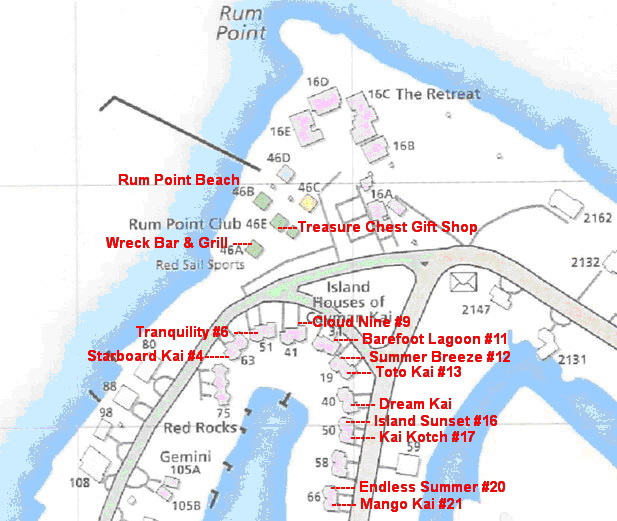 |
Map of Cayman Kai and Island Houses

- The Island House numbers 63, 51, 41, 31, 19, 40, 50, 58, 66 located on the map above are the Island House's street address number. Please look for the Island House "Number" located above the front door of the Island House and just park you car right out in front, on the sand.
- Starboard Kai - Island House #4 - 63 Sand Pointe Road
- Tranquility - Island House #6 - 51 Sand Pointe Road
- Cloud Nine - Island House #9 - 41 Sand Pointe Road
- Barefoot Lagoon - Island House #11 - 31 Sand Pointe Road
- Summer Breeze - Island House #12- 19 Sand Pointe Road
- Toto Kai - Island House #13 - 19 Sand Pointe Road
- Dream Kai - Island House #15 - 40 Water Cay Road
- Island Sunset - Island House #16 -50 Water Cay Road
- Kai Kotch - Island House #17 -50 Water Cay Road
- Endless Summer - Island House #20 -66 Water Cay Road
- Mango Kai - Island House #21 - 66 Water Cay Road
|
|
To view these on our web site just click on Interactive Map.
We suggest that you print a copy of this page, and take it along on your trip. Also for additional information please go to "Info after Reservations" on our web site. On your return home we would appreciate it if you email your comments on your stay to us at caymankaivacations@msn.com Have a pleasant stay in your Cayman Islands Island House. If we can be of any further assistance to you please do not hesitate to contact us at caymankaivacations@msn.com or by phone at (412) 828-2111.
|
Appendix 1: Roundabout use in countries following “driving on the left” rules The roundabout consists of one or two lanes (in some countries there may be more). There will be a traffic island (usually covered with turf or landscaping) in the center of the roundabout. (Note: The roads entering or exiting the roundabout may or may not connect at a right angle and may have dividers between the two directions of traffic.)
When driving on the "left" always look right before entering a roundabout! Give way to traffic on your right, so traffic already on the round-a-bout has right-of-way over traffic entering the round-a-bout. Traffic circles in a “clockwise” direction around the roundabout so you must “bear left” to enter and exit the roundabout. The lane (labeled "1" in Diagram) closest to the outside of the roundabout is used for entering and exiting. · If the first exit from the roundabout is your destination, you should enter the roundabout positioned in the outside lane (labeled "1" in Diagram) so that you can turn immediately. · If the road that you are traveling has two lanes entering the circle and your exit is next, enter the roundabout from the left-hand lane. · If the road that you are traveling has two lanes entering the circle and your destination is on the other side of the roundabout, use the right hand lane to enter the circle, move into the inside lane (labeled "2" in Diagram) and return to the outside/exit lane using your left turn indicator as you approach your destination. · If the road you are exiting on has two lanes in the direction you are traveling, you may find cars exiting from both the inside (labeled "2" in Diagram) and outside lane (labeled "1"in Diagram), so be prepared. If you are unsure where to exit, the simplest strategy is to continue driving around the roundabout until you have had time to read the signs, establish the correct exit for your destination, and move safely into the exit lane (labeled "1" in Diagram). · It is a much better use of your time to stay on the roundabout until you are sure which exit is appropriate than to explore each road and have to turn back. · If you are going to circle the roundabout do it from one of the innermost lanes (labeled 2 in Diagram) and not the outermost which is used for exiting, not for traversing the entire circle. · Also, if you cannot safely move into the exit lane in time for your turn, just continue around the roundabout again until it is safe to do so. · Do not stop when on the round-a-bout (unless you absolutely have to due to some obstruction) – just keep going around again till you can get off safely. · Give way to traffic on the inside lane "2" merging into the outside lane "1"or exiting. This note provides general advice on how to negotiate roundabouts but it is your responsibility to seek specific information on traffic rules, driving procedures, and driving safety from the legal authorities in the Cayman Islands or any country in which you will be driving. These detailed instructions are for a two-lane roundabout. Some roundabouts in Grand Cayman have only one lane – which is even simpler to negotiate. All this may sound a bit complicated but if you follow the rules it’s a very “common-sense,” smooth and efficient way to keep traffic flowing through an intersection, which is why round-a-bouts are used a lot in British and other European territories. |
|
- Robert Wagner
- Phone Number (412) 828-2111
| Need more information or have questions | |
 |
|
 |
|
-

- Cayman Kai Vacations
- "The Island Houses of Cayman Kai"
- Vacation Rentals, Rental Management and Investment Properties
- in the Cayman Kai/Rum Point area, Grand Cayman, Cayman Islands.
-
- Click on to print page
- Click on to return to
- Click on to return to
 |
 |